Free 5-day trial · No credit card

Send 1,000+ WhatsApp messages on autopilot.

Post to all your groups, DM every group member and message your whole contact list from one desktop app. Smart human-like delays protect your number while LeadsUstad WhatsApp Studio sends for you, even from multiple accounts at once.

  • No credit card
  • No sign-up form
  • Installs in 1 minute
  • Every feature open for 5 days
LeadsUstad WhatsApp Studio dashboard showing groups, direct DMs and file contacts being sent at the same time, with a live dispatch log
3 campaigns
running together
7,220messages sent
in one session
Takes about 3 minutes

Start sending today, for free

  1. 1

    Download

    One installer file for Windows 10 and 11. Nothing else to set up.

  2. 2

    Install & press Free Trial

    Open the file, install, and press Free Trial. No card, no form.

  3. 3

    Scan the QR & send

    Link WhatsApp like WhatsApp Web, pick your groups and press Send.

Still copy-pasting the same message into 40 groups, one by one?

  • Hours lost every day forwarding and pasting.
  • Groups get missed, others get the same post twice.
  • Group members never hear from you directly.
  • LeadsUstad WhatsApp Studio does all of it for you. Every group, every member, every contact, exactly once.

See every feature in the real app

These are real LeadsUstad WhatsApp Studio screens. Tap any screenshot to see it full size.

Groups Marketing
Hundreds of groups, one click

Post in every WhatsApp group you belong to, at once

Stop opening groups one by one. Link your number and all your groups load in a list with member counts and your role. Tick the groups, pick your templates, press Send. LeadsUstad WhatsApp Studio posts to every one of them for you.

  • All your groups load automatically. Refresh anytime with Sync
  • See member count and whether you are Admin or Member
  • Read-only groups are locked so no message is wasted
  • Select all groups in one tap
  • Queue several templates in one campaign

Result: a post that took you an hour now goes out while you have tea.

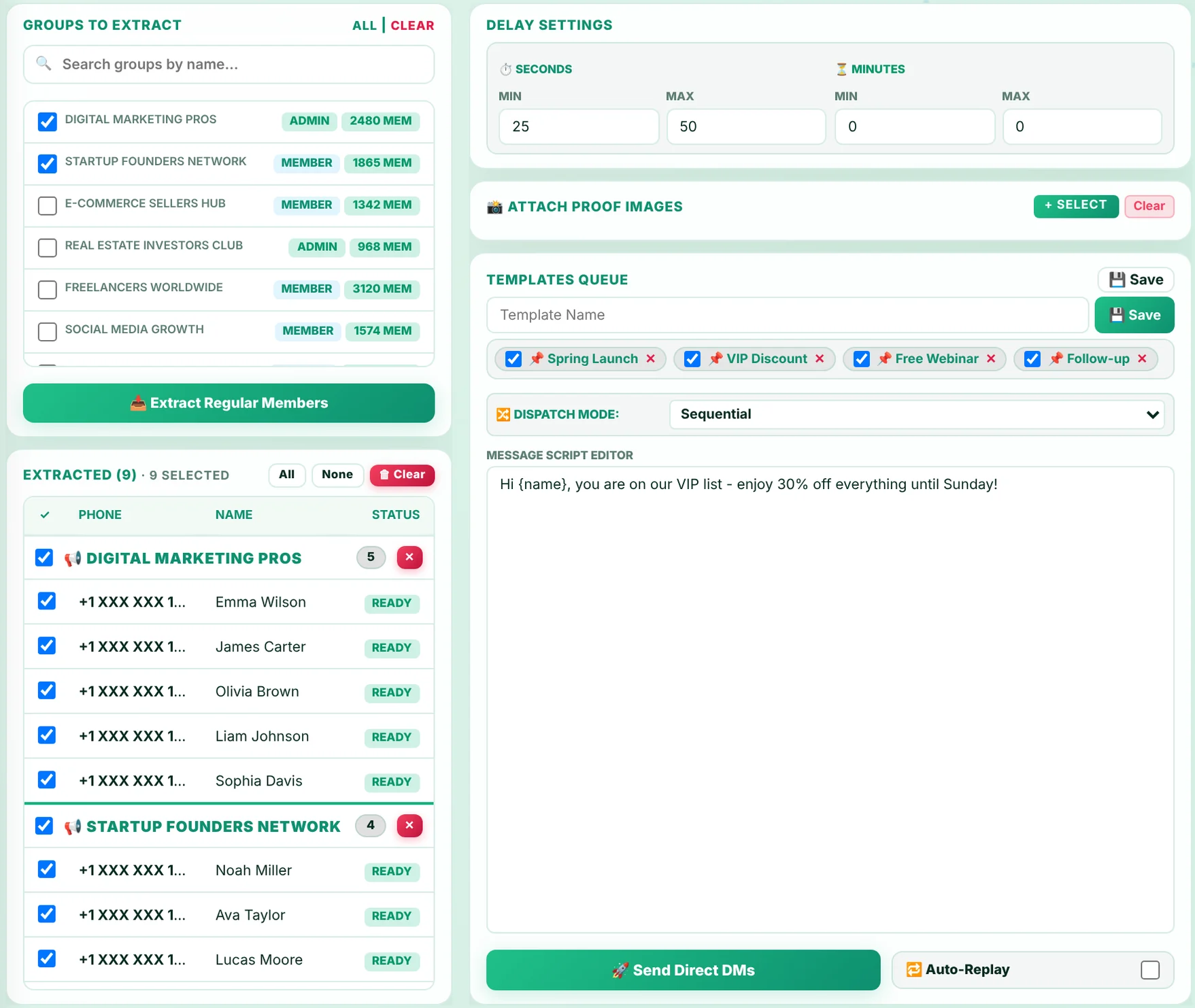
Groups Marketing screen with selected groups, templates queue, delay settings and group terminal
Real app screen: groups selected, 4 saved templates queued, randomized mode and Auto-Replay on.
Group Member Marketing
Turn every group into a lead list

Extract group members and land in their inbox

A post in a busy group gets buried. A direct message gets read. Pick any groups, click Extract Regular Members, and every member appears in a list, grouped by where they came from and ready for a direct message.

  • Extract members from many groups in one click
  • Admins and your own number are skipped automatically
  • Untick anyone you want to leave out
  • Members with hidden numbers are still reachable
  • Personalize with {name} so every DM feels one to one

Result: every group you join becomes a list of real buyers.

Group Member Marketing screen with extracted members listed under each group, ready for DM
Real app screen: members extracted from two groups and marked Ready for DM.
Custom Contacts Marketing
Your list, checked and ready in minutes

Upload your contact list and send to every number

Have customers in an Excel sheet? Upload it. LeadsUstad WhatsApp Studio finds every phone number, formats it, checks which numbers are on WhatsApp and selects only the active ones. No saving contacts, no copy-paste.

  • Upload Excel (.xlsx, .xls), CSV or text files
  • Numbers auto-formatted for Pakistan and international
  • Every number checked on WhatsApp and marked Active or No WhatsApp
  • Inactive numbers are skipped automatically
  • No need to save contacts in your phone

Result: your old customer list becomes a fresh sales campaign today.

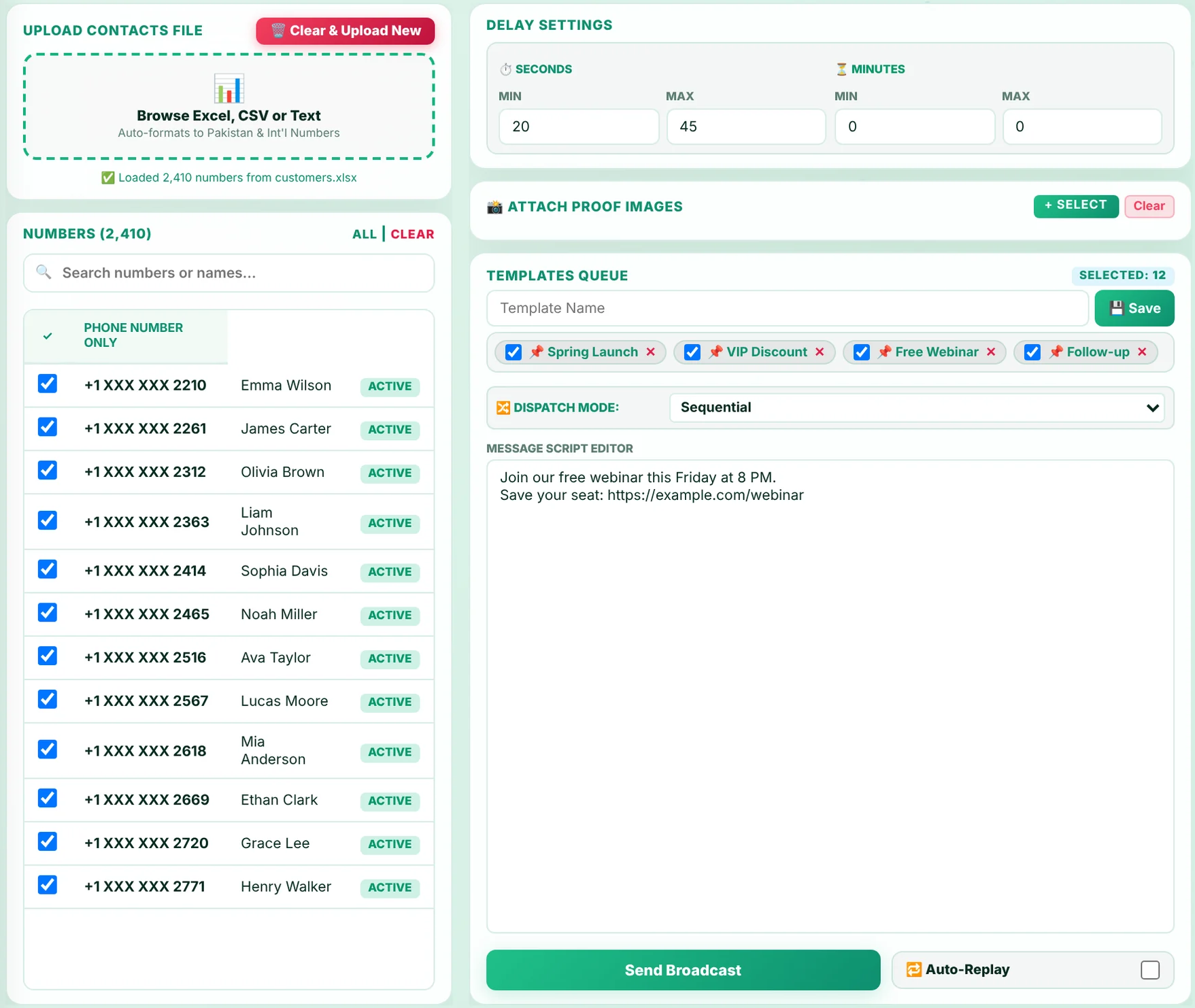
Custom Contacts Marketing screen with uploaded numbers marked Active or No WhatsApp
Real app screen: numbers loaded, active WhatsApp numbers selected.
Parallel campaigns
3 campaigns at the same time

Groups, member DMs and contact lists, all running together

Why wait for one campaign to finish? Start your group broadcast, your member DMs and your contact campaign together. Each runs on its own with its own templates, delays and Stop button, and you watch all of it live.

  • Groups, member DMs and file contacts run in parallel
  • Each channel has its own Pause, Resume and Stop
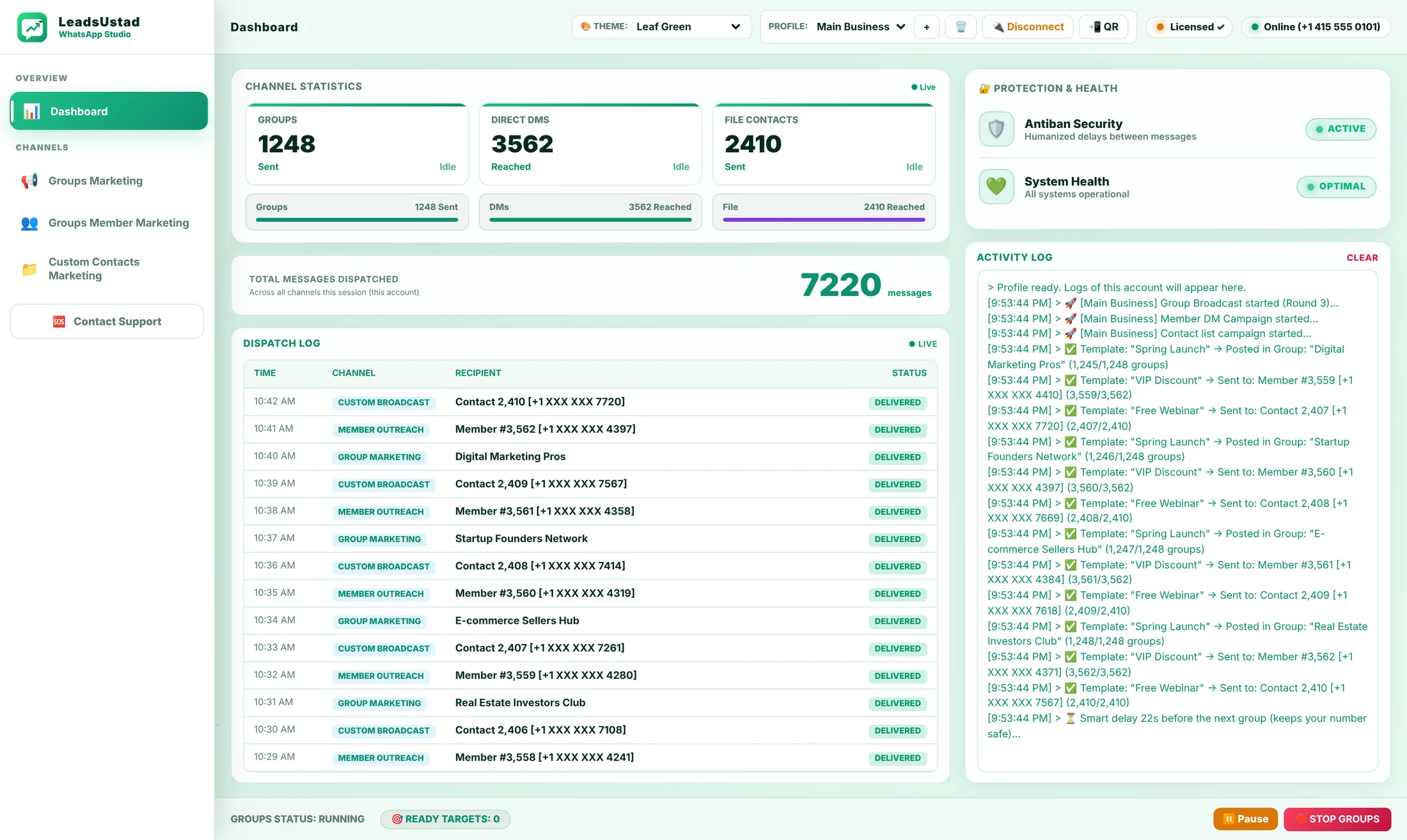
  • Live counts for every channel on one dashboard
  • Dispatch log shows time, channel and recipient of every message
  • Clear activity log in plain English

Result: 7,000+ messages from one account, tracked message by message.

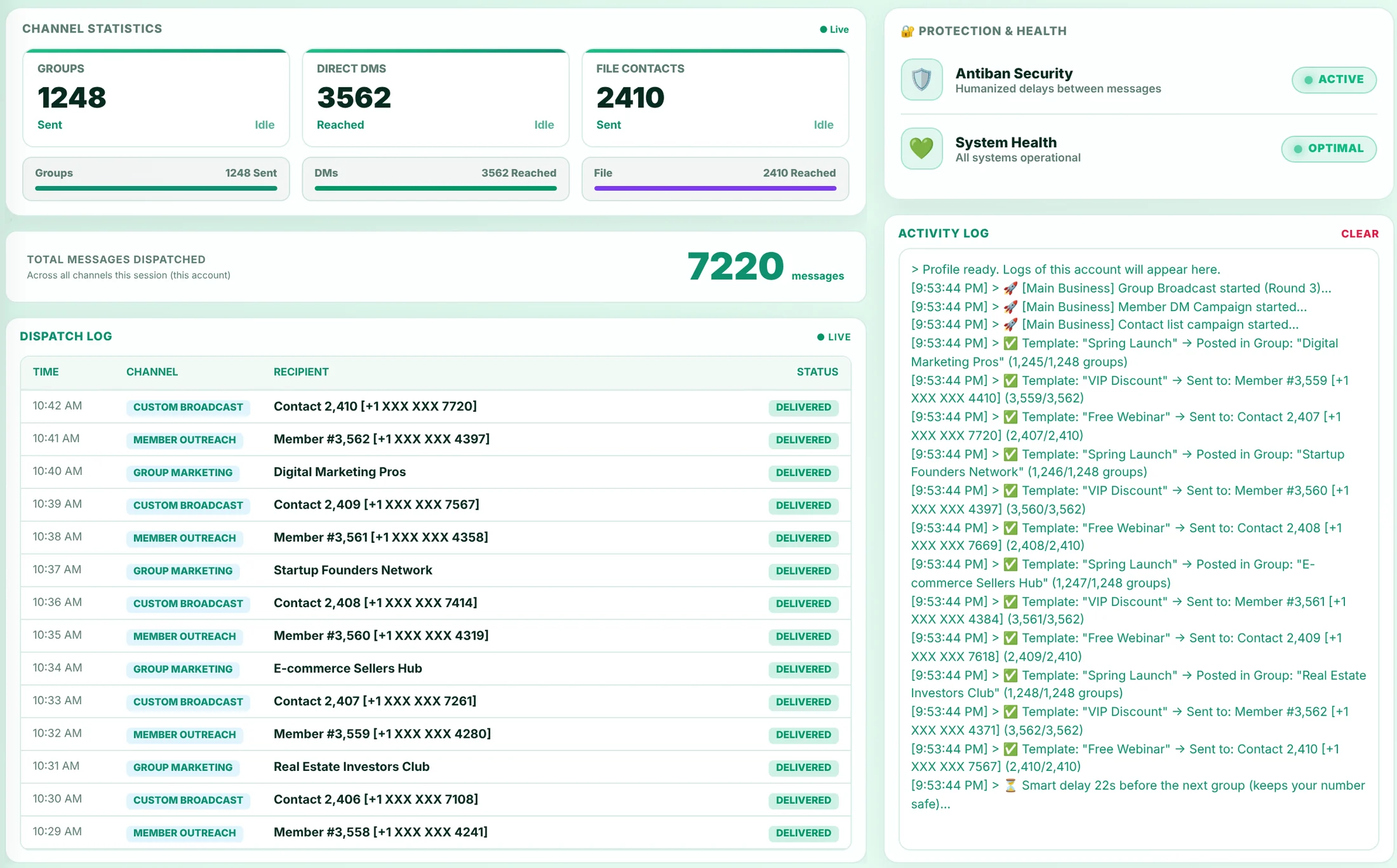
Dashboard showing 7,220 messages sent across groups, direct DMs and file contacts with a live dispatch log
App screen with a sample campaign: 1,248 group posts, 3,562 member DMs and 2,410 contacts from one account.
Multiple accounts
One app, every number you own

Connect multiple WhatsApp accounts, each with its own dashboard

Run your business number, your academy number and your clients' numbers from one app. Add an account, scan its QR code, and it gets its own dashboard: its own groups sent, DMs reached, contacts sent and total messages. Switch from the top bar and every number shows only its own stats.

  • Add a new account in seconds: name it and scan the QR
  • Every account has its own dashboard, stats and dispatch log
  • Separate templates, delays and groups for each account
  • Campaigns on different accounts run at the same time
  • Disconnect or remove any number anytime

Result: manage every business and client from one screen, with clean analytics for each.

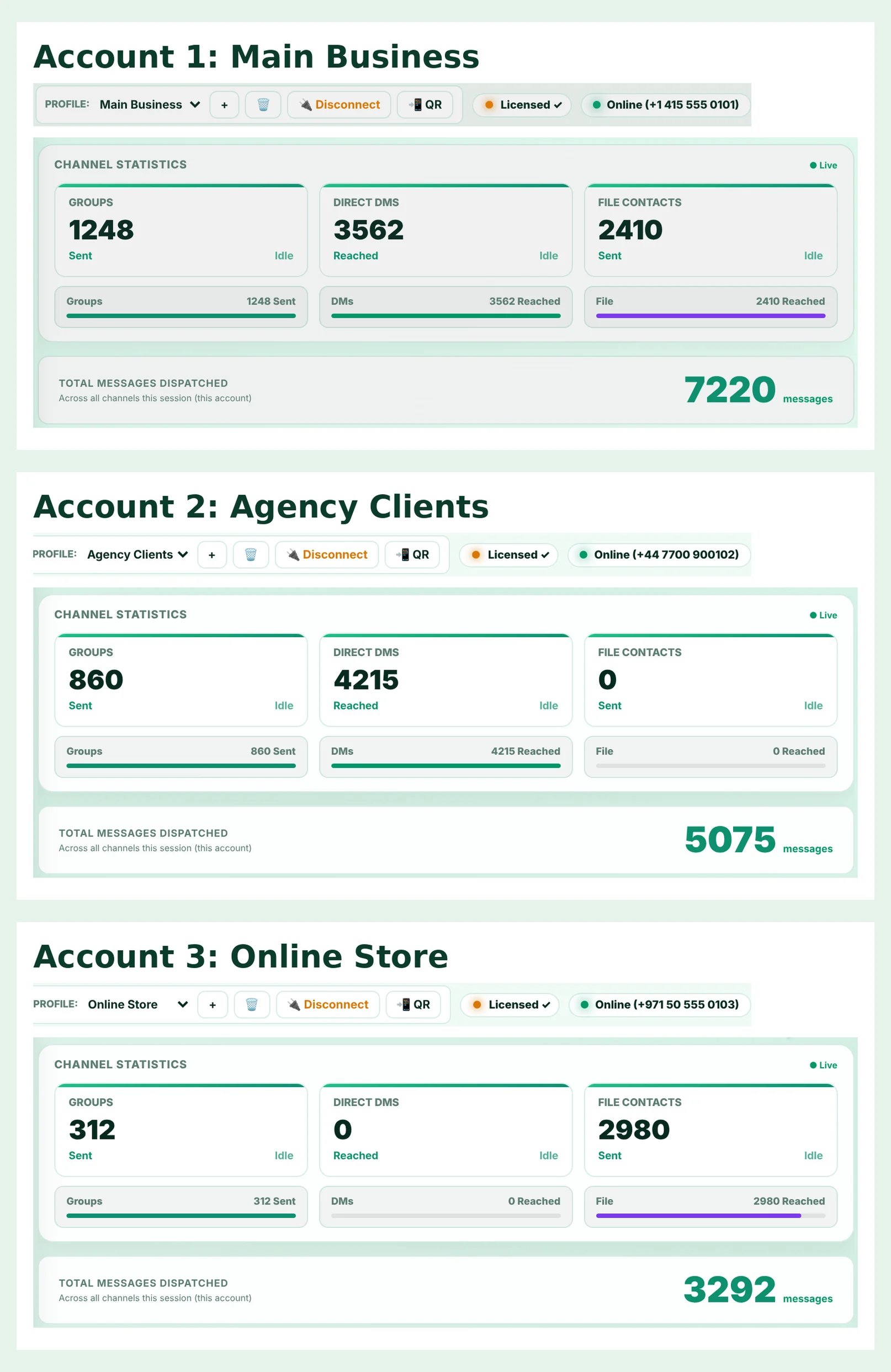
Three WhatsApp accounts, each online with its own number and its own message statistics
Real app: three accounts connected, each with separate statistics.
Saved and editable templates
Write once, send forever

Your best messages saved and ready, edit them anytime

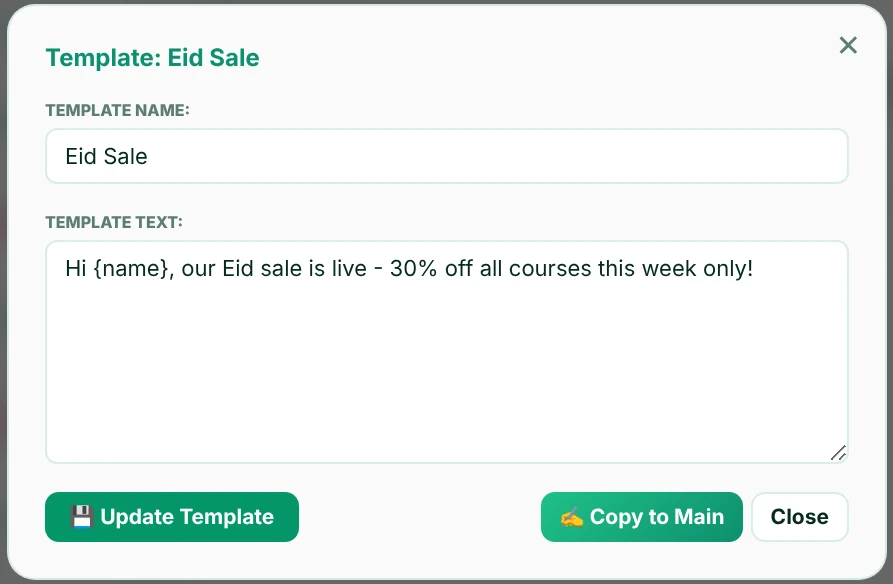
Write a message once and save it as a template. Next time you open the app it is still there, ready to send again. Click any template to change its name or text, update it in one click, or copy it to the editor for a quick tweak.

  • Templates stay saved for every account, even after restart
  • Click any template to edit its name and text
  • Update Template saves your changes instantly
  • Copy to Main loads it into the editor
  • Tick which templates go into each campaign

Result: your winning messages are always one click away.

Edit template window with template name, template text and Update Template button
Real app: editing a saved template with {name} personalization.
Delays and antiban protection
Built to protect your number

Human-like delays that keep your account safe

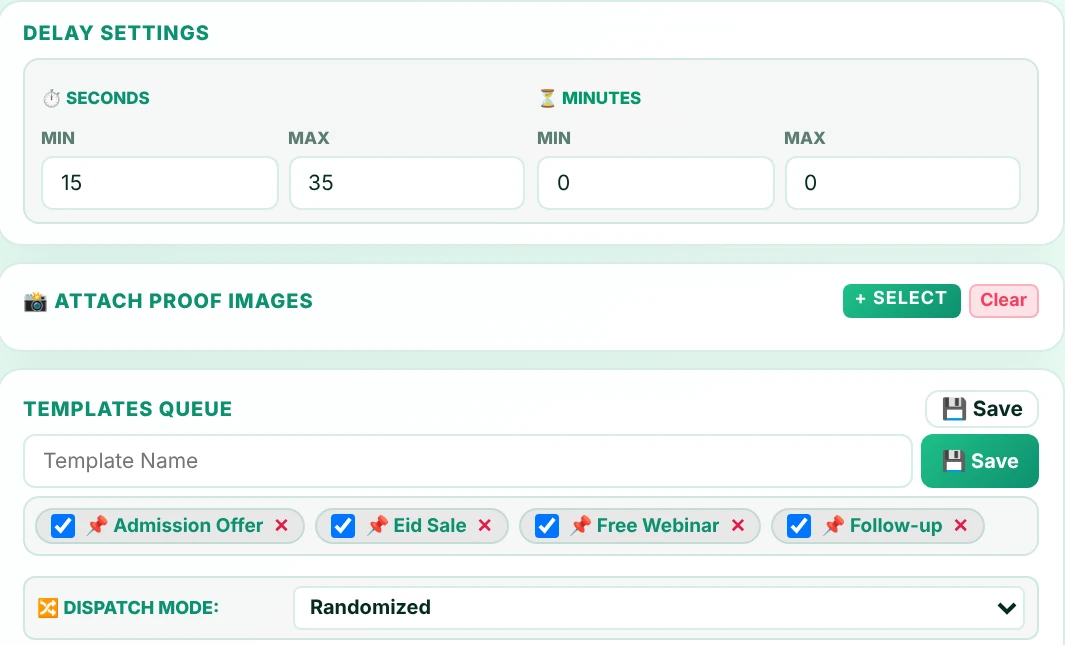
Sending too fast is what gets numbers flagged. LeadsUstad WhatsApp Studio waits a random time between every message, in seconds or minutes, exactly like a real person. Pick sequential or randomized order, turn on Auto-Replay, and let it run.

  • Random delay range in seconds and minutes
  • Sequential or randomized order, each target gets each message exactly once
  • Auto-Replay repeats the campaign in rounds
  • Pause, resume or stop instantly, even mid-campaign
  • Reconnects by itself if the internet drops

Result: steady, natural sending that runs on its own. You only press Start.

Delay settings with seconds and minutes, attach proof images, templates queue and dispatch mode
Real app: a random delay of 15 to 35 seconds with randomized dispatch mode.
Themes

8 beautiful themes. Pick your favourite.

Light or dark, calm or bold. Tap a theme to see the real app in that look. Your choice is remembered every time you open LeadsUstad WhatsApp Studio.

LeadsUstad WhatsApp Studio dashboard in the Leaf Green theme

Your day, before and after

Doing it by hand

  • Open each group, paste, send, repeat
  • Save numbers one by one to message them
  • No idea who already got your message
  • Your phone is busy for hours

With LeadsUstad WhatsApp Studio

  • Tick groups once, press Send
  • Message members and file contacts without saving them
  • Every delivery logged with time and name
  • Runs on your PC while you do other work

Made for people who sell on WhatsApp

Freelancers & agencies

Share your services in every freelancing and business group you belong to.

Academies & course sellers

Announce new batches and admissions to students, parents and communities.

Online shops

Send new stock, sales and offers to your customer list.

Real estate & services

Post fresh listings and follow up with interested buyers directly.

Community admins

Reach all your groups with one update instead of forty.

Recruiters & job posters

Share openings across job groups and message candidates.

Running your first campaign takes minutes

  1. Install

    Download LeadsUstad WhatsApp Studio on your Windows PC.

  2. Link WhatsApp

    Scan the QR code with your phone, just like WhatsApp Web.

  3. Choose & write

    Pick groups, members or a contact file and write your messages.

  4. Press Send

    Watch your campaign go out on the live dashboard.

Also included, and what's next

Broadcast & bulk messages

Send WhatsApp campaigns to thousands of contacts and groups from one place, using your saved templates.

Help inside the app

Contact support straight from the app and attach a screenshot of your issue.

AI campaign calendar & recommended campaigns Coming soon

See sent and scheduled campaigns in a single calendar, with AI recommendations for what to send next, tailored to your business and region.

Drip campaigns Coming soon

Automate multi-step message sequences that stop as soon as a customer replies.

Pay once. Keep sending.

No subscription and no hidden fees. Start with the free trial, then unlock it for good.

Limited offer: save 30%

LeadsUstad WhatsApp Studio

WhatsApp bulk messages sender for groups, group members and contact lists.

  • Groups, members & file contacts
  • Personalized templates & images
  • Multiple accounts, separate dashboards
  • Human-like delays & auto-replay
  • Rich link previews
  • Live dashboard & support
$10$7one-time payment
Bank transferJazzCashEasypaisaPayPalWise
Order now for $7

Try it free first.

Download the app, install it and press Free Trial. Every feature is open for 5 days. No payment needed to start.

Download for WindowsWindows 10/11 · 107 MB · Free for 5 days

Questions before you start

Do I need a card or an account for the free trial?

No. Download the app, install it and press Free Trial. No credit card, no sign-up form. Every feature is open for 5 days.

Windows shows a warning when I install. Is it safe?

Yes. Windows shows "Windows protected your PC" for new apps that are not yet widely downloaded. Click More info and then Run anyway. The app runs only on your PC, and your messages are sent from your own account.

Can my WhatsApp number get banned?

Any bulk messaging carries some risk, and no tool can promise zero risk. LeadsUstad WhatsApp Studio reduces it with random human-like delays, and you stay in control. Keep healthy delays, message people who expect to hear from you, and warm up a brand-new number slowly.

Do I need to save numbers in my phone?

No. You can message group members and numbers from your file directly, without saving them as contacts.

How does the free trial work?

Install the app and start right away. Every feature is open for 5 days. When the trial ends, enter your license key to keep going.

How do I get my license key?

Place your order on this page. We email you the invoice and payment details. Once payment is confirmed, your license key is emailed to you. Paste it into the app and you are done.

Does my computer need to stay on?

Yes. Campaigns are sent from the app on your PC, so keep it on and connected to the internet while a campaign runs. If the internet drops, the app reconnects and continues.

Does it work on Mac or mobile?

LeadsUstad WhatsApp Studio is a Windows desktop app. Your phone only needs WhatsApp to scan the QR code once.

Your first 1,000 messages could be going out today.

$7 one-time while the offer lasts, or start with 5 days free.

Place your order

Fill in your details. We email you the invoice and payment method. Nothing is charged on this page.

No payment is taken here. We confirm everything by email first.

Preparing your download

LeadsUstad

One quick security check, then your download starts by itself.

Order received!

Thank you. Your order has reached us.

  1. We email your invoice with payment details to the address above, usually within a few hours.
  2. Pay, then upload your payment screenshot with the button in that email.
  3. We confirm it and email your license key.

No email after a few hours? Check your spam folder, or write to info@leadsustad.io.